
Productivity Workflows
How to Use Task it All Comments and Mentions to Keep Team Decisions Traceable (Audit-Friendly Workflow for Small Teams)
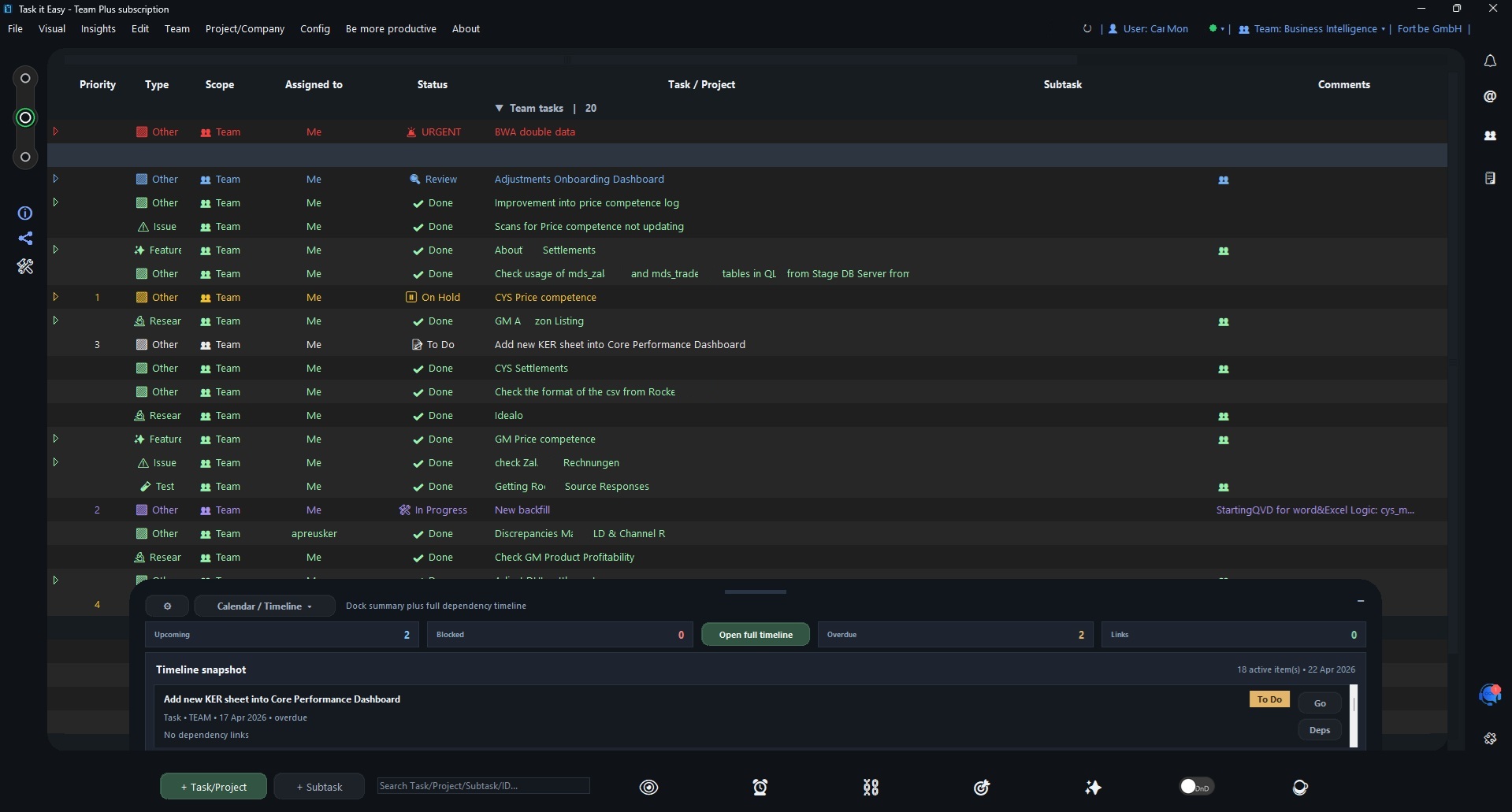
How to Use Task it All Comments and Mentions to Keep Team Decisions Traceable
Small teams often make decisions quickly: in a meeting, in a chat, after a customer message, or while reviewing a blocked task. The problem is not speed. The problem is losing the reason behind the decision.
When decisions are scattered across memory, private messages, separate notes, and unfinished tasks, follow-up becomes harder. People ask the same questions again. Work gets reopened without context. Owners change, but the reasoning does not move with the task.
Task it All helps small teams keep more of that context close to the work itself. With tasks, subtasks, comments, mentions, assignments, notes, due dates, reminders, priorities, statuses, team visibility, and operational audit layers, teams can create a practical decision trail without turning everyday work into bureaucracy.
This guide explains how to use Task it All comments and mentions for traceable team decisions in an audit-friendly way.
> This is not legal, compliance, or regulatory advice. The workflow below is designed to support clearer records, better review habits, and stronger operational visibility for small teams.
Why traceable decisions matter for small teams
Small teams usually move fast because they have to. A founder approves a change, an operations lead reassigns work, a support person confirms a customer follow-up, or a project owner changes the due date.
Those decisions may be simple, but they still need context:
- What was decided?
- Who was involved?
- Why was the decision made?
- What task, subtask, or project did it affect?
- What changed after the decision?
- Who is responsible for the next step?
Without a shared record, a team can lose time reconstructing the past. A traceable comment workflow helps preserve the “why” next to the “what.”
Task it All is useful here because comments, mentions, assignments, statuses, and team visibility can sit inside the same desktop workflow where the work is already being planned and executed.
The core idea: keep decisions attached to the task
The simplest rule is this:
If a decision affects a task, subtask, assignment, due date, priority, or status, record the decision in the relevant Task it All item.
That keeps the discussion connected to the operational object it changes. Instead of saving decisions in a separate document that people may not open, the team can review the decision while looking at the actual work.
A good decision comment should answer four questions:
- Decision: What are we doing?
- Reason: Why are we doing it?
- Owner: Who is responsible for the next action?
- Follow-up: What happens next, and by when if a date matters?
Example comment structure:
> Decision: Move the onboarding checklist review to Friday.
> Reason: The customer feedback notes are not complete yet.
> Owner: @TeamMember to update the checklist before review.
> Follow-up: Recheck status before Friday’s planning session.
This is simple enough for daily use but structured enough to support later review.
When to use comments vs. notes vs. direct messages
Task it All supports comments, notes, and direct messages. Each one has a different role in a traceable workflow.
Use comments for decisions and task-specific discussion
Use comments when the message should remain attached to a task, project, subtask, or shared work item. Comments are ideal for:
- Approval notes
- Scope changes
- Due date changes
- Priority changes
- Blocker explanations
- Assignment clarification
- Review outcomes
- Handoff instructions
If someone needs to understand the history of the task later, the comment belongs there.
Use notes for supporting context
Use notes when the information is useful background but not necessarily a decision. Notes can help capture:
- Research details
- Meeting preparation
- Draft ideas
- Internal checklists
- Reference material
- Longer explanations
Notes are helpful when the team needs detail, but the decision itself should still be summarized in a comment.
Use direct messages for fast coordination, then summarize the outcome
Direct messages are useful when coordination needs speed. However, if a direct message results in a decision that changes the work, summarize the final decision in the task comments.
Example:
> Decision summary from quick chat: We will keep the current delivery date but reduce the first release scope to the three confirmed items. @Owner will update subtasks today.
This keeps chat speed without losing task-level traceability.
A practical comment format for audit-friendly teamwork
Small teams do not need a complex template for every comment. But for important decisions, a consistent format makes review much easier.
Use this lightweight format:
```text
Decision:
Reason:
People involved:
Next action:
Due date or alarm:
Status impact:
```
Example:
```text
Decision: Reassign the file review task to Ana.
Reason: Luis is focused on the customer follow-up today.
People involved: @Ana @Luis
Next action: Ana reviews the attached file and adds comments.
Due date or alarm: Tomorrow morning.
Status impact: Keep task In Progress until review is complete.
```
This format is especially useful for:
- Team leads
- Founders
- Operations coordinators
- Client-facing teams
- Any team that needs clearer handoffs
The goal is not to create extra paperwork. The goal is to make the next review faster and less dependent on memory.
How mentions help reduce ambiguity
Mentions help clarify who needs to see or act on a decision. In a small team, people often assume “everyone knows.” That assumption breaks down as soon as the team has multiple projects, multiple teams, or a busy week.
Use mentions when:
- A person owns the next action
- A teammate needs to confirm a decision
- Someone is affected by a change
- A reviewer needs to inspect a task
- A handoff is happening
A strong mention is specific:
> @Maria please confirm whether the updated due date works for the support handoff.
A weak mention is vague:
> @Maria thoughts?
The difference matters. Specific mentions create clearer accountability and reduce follow-up questions.
Connect comments to assignments, statuses, and due dates
Comments are most useful when they explain visible workflow changes.
For example, if a task changes from “Open” to “In Progress,” the comment can explain why. If the due date changes, the comment can preserve the reason. If a task is reassigned, the comment can show who is now responsible and what they need to do.
A practical flow looks like this:
- Update the task status, owner, priority, or due date.
- Add a comment explaining the reason for the change.
- Mention the person who needs to act or confirm.
- Add or update a subtask if the decision creates follow-up work.
- Use reminders or alarms when the decision needs time-based follow-up.
For date-heavy workflows, you can also connect this habit with planning in the Calendar/Timeline. Related guide: How to Use Task it All’s Calendar/Timeline for Due Dates, Alarms, and Status Planning.
Use subtasks to turn decisions into action
A decision is only useful if it creates clarity. If the decision requires work, create or update a subtask.
Examples:
- Decision: “We will review the proposal again before sending.”
Subtask: “Review proposal changes.”
- Decision: “We need a customer confirmation before implementation.”
Subtask: “Ask customer to confirm final requirement.”
- Decision: “Move reporting to next week.”
Subtask: “Prepare reporting summary before Monday.”
This keeps decision history and execution connected. The comment explains the reasoning; the subtask captures the action.
Keep team spaces separated when decisions belong to different teams
Task it All supports creating and managing multiple teams inside the same company context. This matters when decisions should stay visible to the right group without mixing workspaces.
For example:
- Product decisions can stay in the product team space.
- Customer follow-up decisions can stay in the support or operations team space.
- Administrative work can stay separate from delivery tasks.
When a decision affects more than one team, summarize the relevant action in the appropriate team task rather than relying on one shared conversation to serve every group.
This helps each team keep its own operational record while still supporting company-wide coordination.
Build a simple decision trail for recurring work
Recurring work often creates repeated decisions: approve, delay, reassign, review, close, reopen, or escalate. A consistent comment trail makes these patterns easier to inspect later.
For recurring workflows, use a repeated structure:
- Start comment: What is the expected outcome?
- Change comments: What changed and why?
- Blocker comments: What is preventing progress?
- Review comment: What was checked?
- Close comment: What result was accepted?
Example close comment:
> Closed after review. The final checklist was updated, the due date was met, and no remaining blockers were reported. @TeamLead confirmed completion.
This gives the team a cleaner history without requiring a separate report for every task.
Use notifications so decision mentions are not missed
A traceable comment is only useful if the right people notice it. Task it All supports visible and audible notification behavior for new assignments, including an icon counter, sound alerts, and on-screen notices, with configurable notification behavior for different work styles.
For small teams, this can help reduce missed handoffs. If your workflow depends on assignments and mentions, review notification settings so people are alerted in a way that fits how they work.
Related guide: How to Set Up Notifications for Assignments in Task it All.
Make comments easier to review later
Traceability depends on writing comments that are useful after the moment has passed. Here are practical rules for better review quality.
1. Write the decision in the first sentence
Do not bury the outcome under a long explanation.
Good:
> Decision: Keep the current launch date and reduce the first scope.
Less useful:
> After thinking about the different options and reviewing several things, maybe we should probably keep the launch date...
2. Mention names when action is required
If someone needs to act, mention them directly and explain the action.
Good:
> @Nora please update the status after the customer confirms the final file.
3. Explain why dates changed
Date changes are common sources of confusion. Add the reason.
Good:
> Due date moved to Thursday because the file review depends on the updated attachment.
4. Separate opinion from decision
It is fine to discuss options, but mark the final outcome clearly.
Good:
> Options discussed: A and B. Decision: Use option B because it requires fewer handoffs.
5. Create a subtask for unresolved follow-up
If the comment includes future work, create a subtask so the action does not disappear inside the discussion.
How Task it All supports audit-friendly visibility
Task it All includes team collaboration features, comments, assignments, visibility, synchronization, and operational audit coverage depending on the plan and scope being used.
For teams that need more operational control, the product also includes audit-oriented foundations such as append-only events, SHA-256 event and batch hashes, correlation ids, scoped visibility, and audit controls for areas like sessions, devices, shares, and admin actions.
For everyday teams, the practical value is simple: comments, task changes, team context, and visibility can work together so decisions are easier to review than they would be in scattered tools.
This does not guarantee compliance with any specific regulation, and it does not replace legal or compliance review. But it can help teams maintain clearer operational records and reduce decision ambiguity.
Suggested workflow: from decision to follow-up
Use this simple five-step workflow when a team decision affects work in Task it All.
Step 1: Open the relevant task or subtask
Start where the work lives. If the decision affects a subtask, record the decision there or summarize it on the parent task if the whole project is affected.
Step 2: Add a clear decision comment
Use a short structure:
```text
Decision:
Reason:
Owner:
Next action:
```
Step 3: Mention the people who need to act
Use mentions for the owner, reviewer, or person affected by the change.
Step 4: Update the operational fields
If the decision changes the work, update the relevant fields: assignment, status, due date, alarm, priority, or task type.
Step 5: Create a subtask for follow-up
If there is a next action, make it visible as a subtask instead of leaving it only in the comment.
Example: a traceable decision in a small team
Imagine a small team is preparing a customer delivery task.
The original task is:
> Prepare customer delivery package
During review, the team realizes that one attachment is missing and the due date needs to move.
A strong Task it All comment could be:
```text
Decision: Move delivery package completion to Thursday.
Reason: The final attachment is still missing from the review set.
People involved: @Sara @Leo
Next action: Sara will upload the attachment; Leo will review the final package.
Due date or alarm: Thursday morning.
Status impact: Keep the task In Progress until Leo confirms review.
```
Then the team can:
- Update the due date.
- Keep or change the status.
- Add a subtask for “Upload final attachment.”
- Add a subtask for “Review final package.”
- Mention the responsible people.
Now the decision, reason, owner, and follow-up are all easier to find.
Common mistakes to avoid
Mistake 1: Using comments as unstructured chat
Comments can support discussion, but important decisions should be marked clearly. Use “Decision:” when the outcome matters.
Mistake 2: Mentioning everyone
Mention only the people who need to know or act. Too many mentions can make alerts less meaningful.
Mistake 3: Changing fields without explanation
If a due date, owner, or status changes, add a short comment explaining why.
Mistake 4: Leaving action items inside comments only
If a comment creates work, turn the work into a subtask.
Mistake 5: Mixing team spaces
If your company uses multiple teams in Task it All, keep decisions in the right team context so visibility stays clear.
A simple comment template your team can reuse
Copy this template into your team habits for important decisions:
```text
Decision:
Reason:
Mentioned people:
Owner:
Next action:
Due date / alarm:
Status or priority change:
```
Short version:
```text
Decision:
Reason:
Owner:
Next step:
```
The short version is enough for most daily decisions. The longer version is better when a task has audit, review, customer, or operational importance.
FAQ
How do I use Task it All comments and mentions for traceable team decisions?
Use comments to summarize the decision, the reason, the owner, and the next action. Use mentions when a specific person needs to act, confirm, or review. If the decision creates work, add or update a subtask.
Are comments better than direct messages for decisions?
For task-related decisions, comments are usually better because they stay attached to the work item. Direct messages can be useful for fast coordination, but important outcomes should be summarized in the relevant task comment.
Can Task it All help with audit-friendly workflows?
Yes, Task it All is designed to support operational visibility with team collaboration, comments, assignments, permissions, and audit-oriented layers depending on the plan and scope. It can help teams keep clearer records, but it does not replace legal or compliance advice.
When should I mention someone in a comment?
Mention someone when they own the next action, need to confirm a decision, are affected by a change, or must review the work. Keep mentions specific so they create clarity instead of noise.
Should every comment follow a template?
No. Everyday comments can be simple. Use a template for decisions that change ownership, dates, priority, status, scope, or customer-facing work.
What plan do small teams need for collaboration?
The Free plan is designed for personal tasks and secure local work. Teams unlocks TEAM scope, collaboration, assignments, comments, visibility, realtime coordination, and basic audit. Team Plus extends Teams with add-ons, advanced collaboration, premium governance, and deeper audit coverage.
Soft CTA: make team decisions easier to follow
If your team is trying to reduce scattered decisions, unclear handoffs, and repeated status questions, Task it All gives you a desktop workspace for tasks, subtasks, comments, assignments, notes, reminders, and team visibility.
You can start with personal organization and scale into TEAM scope when collaboration matters. Organize your team tasks with Task it All.
Internal-link suggestions
- For planning decisions around dates and alarms, read How to Use Task it All’s Calendar/Timeline for Due Dates, Alarms, and Status Planning.
- For making sure new assignments are noticed, read How to Set Up Notifications for Assignments in Task it All.
- For the product overview and plan path, visit Organize your team tasks.