Daily Planning
How to Turn a Loose Task List into a Realistic Daily Plan with AI
How to Turn a Loose Task List into a Realistic Daily Plan with AI
A loose task list can feel productive at first: everything is captured, nothing is forgotten, and the day still looks open. But that same list can also make planning harder. When every task looks equally important, it becomes easy to overfill the day, guess at timing, and spend the morning rearranging work instead of doing it.
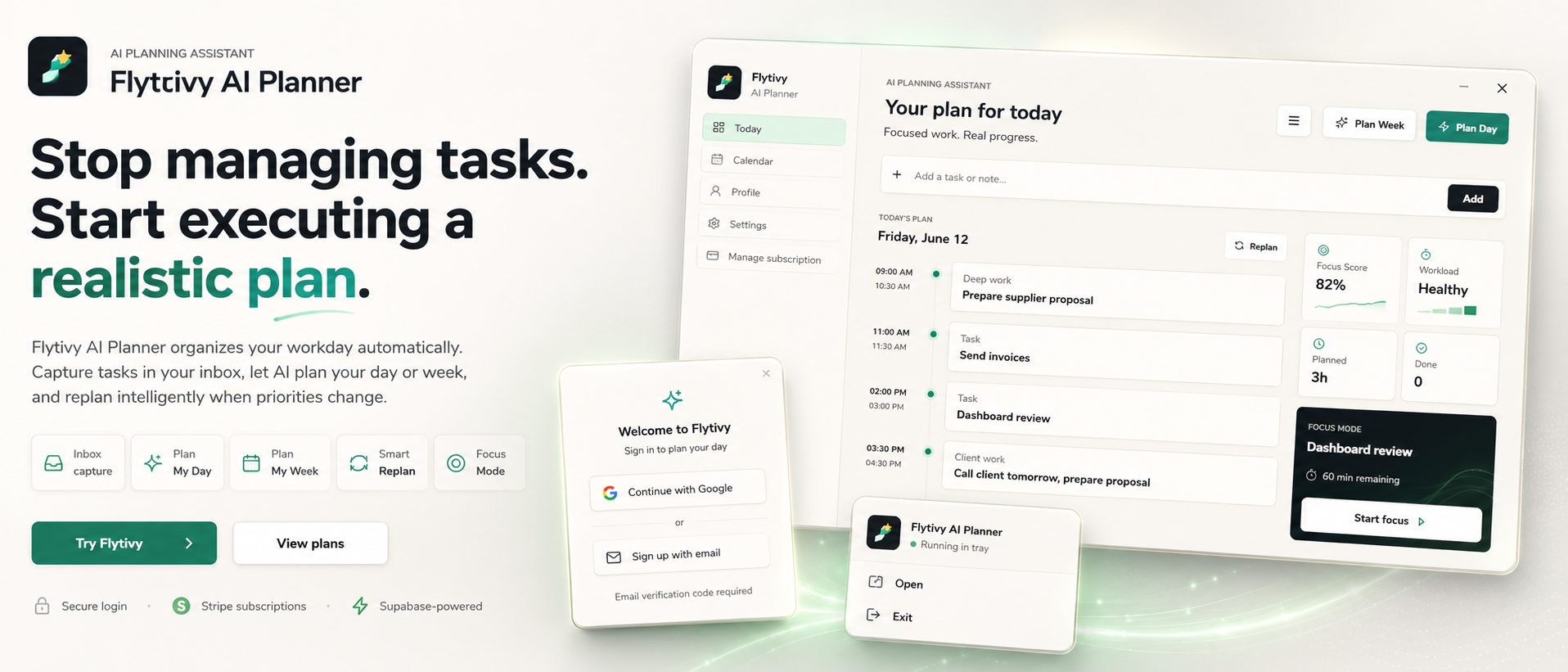
That is where AI daily planning can help. Instead of acting like a calendar that simply shows time blocks, Flytivy AI Planner is designed to take scattered tasks, deadlines, priorities, estimated durations, and energy context, then turn them into a realistic plan for the day. The goal is not to add more busywork. It is to help you decide what to do now, what to leave for later, and how to keep the plan executable when the day changes.
If you want to try it directly, you can plan your day with Flytivy.
Why loose task lists break daily planning
Task lists are useful for capture, but they do not automatically create a workable schedule. Most lists miss at least one of these planning details:
- how long each task is likely to take
- which tasks need more focus
- what deadline pressure actually exists
- what the user has energy for today
- what must happen before a meeting or handoff
Without that context, the day gets overcommitted. You may start with good intentions, then discover at 2 p.m. that there is no real space for the tasks you planned in the morning.
AI daily planning is useful here because it can turn unstructured task data into something more executable. In Flytivy, the core idea is automatic work planning: you add the work you need to do, and the app helps shape it into a day plan, a week plan, or a replan when things change.
What realistic AI daily planning should consider
A realistic plan is not just a list in a different order. It should reflect constraints that people actually face during the workday.
1. Task priority
Some tasks are more important because of deadlines, client impact, or dependency chains. Others are important but can move. AI planning can help sort those items so the day starts with the work that matters most.
2. Estimated duration
A list of ten tasks is not a plan unless each task has some sense of time attached. Even rough estimates help avoid overload.
3. Energy and focus needs
A 20-minute admin task and a 90-minute deep work block should not be treated the same way. Flytivy supports energy-type context so users can separate lighter work from more demanding work.
4. Calendar context
Meetings, calls, and interruptions shape the day. Flytivy can use calendar and Gantt views as planning views, while the actual value remains the planning decision itself: what should happen now, next, and later.
5. Unfinished work
A plan is only useful if it can adapt. If the day changes, you may need to replan unfinished tasks rather than manually reshuffle everything yourself.
A simple workflow for turning a loose list into a daily plan
Here is a practical workflow you can use when your tasks are captured but not yet organized.
Step 1: Capture the work without forcing order
Start by collecting the tasks you need to handle today or soon. Include deadlines, notes, and any information that affects timing. If a task is tied to a meeting, include that context too.
Step 2: Add rough duration and energy context
Even if estimates are imperfect, they are better than guessing later. Mark the tasks that need strong focus and the ones that can be handled in a lighter mental state.
Step 3: Let the planner shape the day
Flytivy’s Plan Day flow is designed to convert those loose inputs into a realistic schedule. The emphasis is on executable sequencing, not on filling every available minute.
Step 4: Review the plan for overload
A good day plan should feel possible. If the output is too full, trim lower-priority items or move them into a later window.
Step 5: Replan when the day changes
When a meeting runs long or a priority shifts, you do not need to manually rebuild the whole day. Flytivy supports replanning unfinished work, which is useful when the schedule changes after the plan is already in motion.
How Flytivy AI Planner supports daily planning
Flytivy is positioned as an AI planning assistant, not a generic calendar. That distinction matters because the product is focused on planning decisions rather than simply displaying events.
Flytivy can help with:
- turning loose tasks into a daily plan
- building a weekly plan from changing work
- replanning unfinished items when priorities shift
- reviewing workload and next actions with Flytivy Coach
- using focus and energy context to shape the schedule
- bringing in Google Calendar context when needed
The app also supports task capture, calendar and Gantt views, focus mode, workload and focus scoring, direct task actions, alarm actions, subscription credits, and bilingual English/Spanish UI.
Credits and plan limits to know
If you are using the Free plan, the credit model matters. Free includes 30 AI credits per month for each of the first two associated-account months. From month three, Free receives 0 new monthly AI credits unless the user upgrades.
Planning actions use credits as follows:
- Plan Day: 1 AI credit
- Plan Week: 1 AI credit
- Replan: 1 AI credit
- Coach message: 0.25 credits
Pro includes 350 monthly AI credits, and Ultimate includes 900 monthly AI credits. If you expect to plan and replan often, it is worth choosing a plan that fits your usage pattern.
When AI daily planning is most useful
AI daily planning is especially helpful when your day has a lot of moving parts, such as:
- client work with changing priorities
- founder or operator tasks that mix strategy and execution
- consultant schedules with mixed deep work and meetings
- project lead days with dependencies and handoffs
- remote work where the boundaries between tasks blur
It can also help when your main problem is not task capture, but turning captured tasks into a schedule you can actually follow.
Example: from task list to realistic day
Imagine a day with these loose tasks:
- finish proposal draft
- answer client email backlog
- prepare for 2 p.m. meeting
- review team notes
- update invoice
- follow up on open bug report
A simple list like that does not tell you where to start. A realistic AI plan might group the work by focus demand and timing:
- start with the proposal draft while energy is higher
- handle short admin work in a lighter block
- reserve prep time before the meeting
- move the bug follow-up to a later slot if it depends on the meeting outcome
- leave buffer for interruptions instead of packing every hour
That is the kind of planning support Flytivy is built for: not just organizing tasks, but deciding on an order that makes the day more executable.
Related guides
If you want to go deeper, these resources may help:
- How to Prioritize Tasks with AI When Everything Feels Urgent
- How to Replan a Busy Day with AI When Your Priorities Change
FAQ
What is AI daily planning?
AI daily planning is the process of using AI-supported context such as task priority, duration, energy needs, and calendar constraints to turn a task list into a realistic plan for the day.
Is Flytivy just another calendar app?
No. Flytivy is positioned as an AI planning assistant. Calendar and Gantt are views, but the core value is automatic work planning: deciding what to do now and how to sequence the work.
Can Flytivy help if my task list keeps changing?
Yes. That is one of the main use cases. Flytivy can help build a day plan and then replan unfinished work when priorities shift.
Does Flytivy require perfect task estimates?
No. The planner works best with useful inputs, but rough duration and energy context can still help produce a more realistic schedule than a simple list.
What happens on the Free plan?
Free includes 30 AI credits per month for each of the first two associated-account months. From month three, Free receives 0 new monthly AI credits unless the user upgrades.
Final takeaway
A loose task list becomes useful when it turns into a plan that reflects time, energy, and real constraints. AI daily planning can help you move from scattered tasks to an executable day with fewer manual reshuffles.
If you want to try the workflow, plan your day with Flytivy or replan unfinished work when the schedule changes.