Replanning Workflows
How to Replan a Busy Day in Minutes with AI: A Practical Workflow for Solo Professionals
How to Replan a Busy Day in Minutes with AI: A Practical Workflow for Solo Professionals
When your day changes, the problem is usually not a lack of tasks. It is the amount of manual reshuffling needed to make the day workable again.
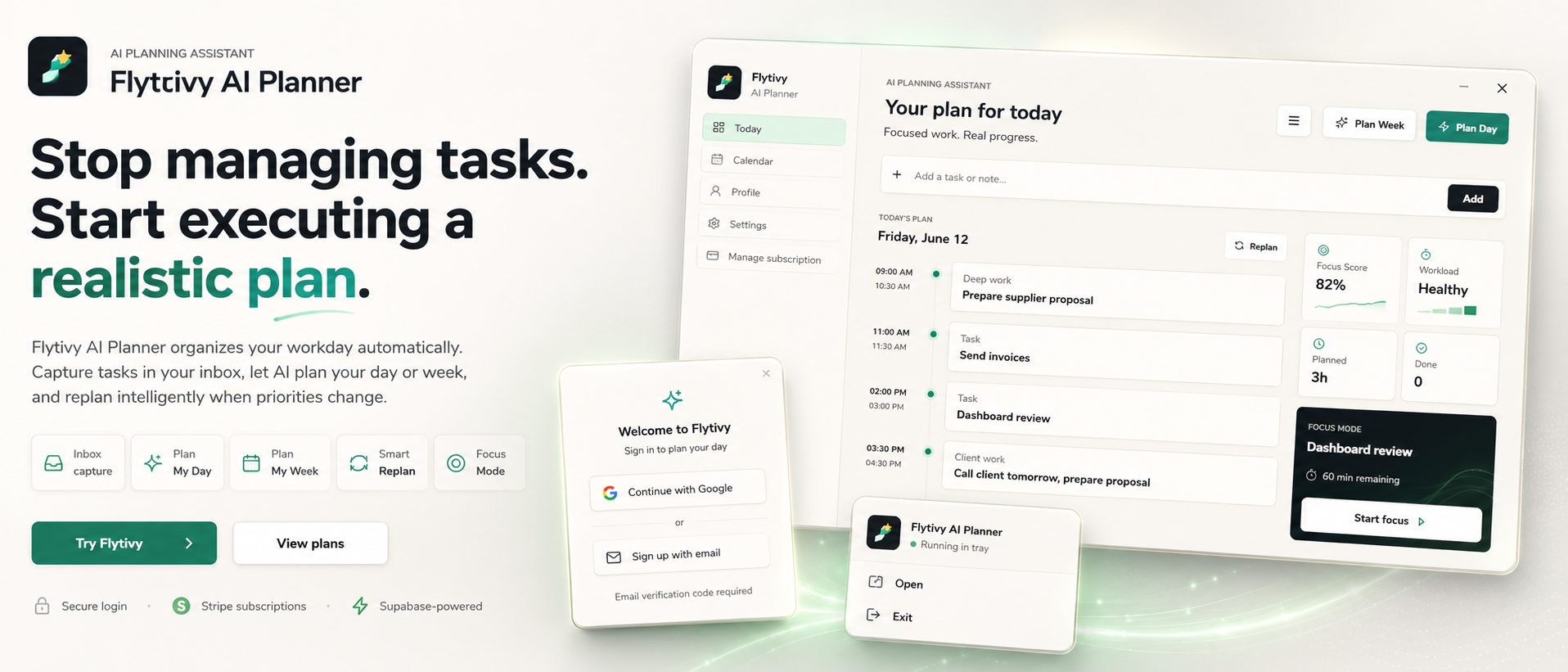
That is where AI replanning can help. Instead of dragging tasks around a calendar one by one, Flytivy AI Planner is designed to turn unfinished work, new priorities, deadlines, and energy levels into a realistic updated plan. It is not a generic calendar. The core value is automatic work planning that helps you decide what to do now, what to postpone, and how to recover the day when things move.
If you want to see the product in action, start with Plan your day with Flytivy.
What AI replanning means in practice
AI replanning is the process of rebuilding a plan after something changes.
That might happen when:
- a meeting runs long
- a deadline moves up
- you finish less than expected
- a task takes more energy than planned
- a new priority appears midweek
Instead of treating the calendar as the source of truth, Flytivy uses your task list, priorities, estimated durations, focus level, and energy type to help generate a new plan for the remaining time.
Why manual rescheduling breaks down
Many professionals already capture tasks, but the hard part is turning that list into something executable.
Manual rescheduling usually creates friction because you have to:
- compare task urgency against remaining time
- estimate what still fits today
- decide which work should move to tomorrow
- account for energy and attention, not just time
- avoid overloading the rest of the week
That effort often becomes the bottleneck. A replanning workflow is useful when it reduces that overhead and gives you a clearer next step.
A simple AI replanning workflow
Here is a practical way to use AI replanning without overcomplicating it.
1) Capture what changed
Start with the tasks that are still open, plus any new items that matter now.
In Flytivy, you can capture loose tasks, deadlines, priorities, and estimated durations. If you also know the energy type required for the work, that can improve the shape of the plan.
2) Review the remaining day or week
Look at the available time left in the day or week, along with meetings and other fixed events.
Flytivy supports calendar and Gantt views, but those are there to support planning, not replace it. The main goal is to produce a plan that fits reality.
3) Rebuild the plan around what is still possible
This is where the replanning step matters.
Flytivy can take the tasks that remain and help create a new day plan or week plan based on your current constraints. That can make it easier to choose a smaller set of achievable work instead of trying to force everything into the day.
4) Protect focus blocks
A good replanned day is not just a list. It should also reflect attention.
Flytivy includes focus-oriented planning so you can organize work around the kind of concentration each task needs, not only the clock.
5) Replan again when needed
Plans change. When they do, the workflow should stay lightweight.
Flytivy supports a Replan flow for unfinished work so you can rebuild the schedule rather than manually re-editing everything.
Where Flytivy AI Planner fits
Flytivy AI Planner is built for solo professionals and small teams that want automatic work planning instead of a static calendar view.
It can help you:
- turn task lists into daily or weekly plans
- rebuild the day when priorities shift
- account for focus and energy patterns
- keep calendar context visible
- review next actions through Flytivy Coach
Flytivy Coach can also help review tasks, conflicts, workload, credits, subscription state, and next actions. Each Coach message uses AI credits, so it is useful to keep that in mind when planning your usage.
Credit usage to know before you replan
Flytivy uses AI credits for planning actions.
A few important limits to understand:
- Plan Day costs 1 AI credit
- Plan Week costs 1 AI credit
- Replan costs 1 AI credit
- Each Coach message costs 0.25 credits
Free includes 30 AI credits per month for each of the first two associated-account months. From month three, Free receives 0 new monthly AI credits unless the user upgrades.
If you expect to replan often, Pro or Ultimate may be a better fit because they include more monthly AI credits.
When AI replanning is most useful
AI replanning is especially helpful when your work is variable and your day is not fully predictable.
Common use cases include:
- founders balancing meetings and execution
- consultants switching between client work
- project leads managing shifting priorities
- remote workers with fragmented time
- busy professionals who want a clearer next step
In these cases, the value is not just “seeing everything.” It is deciding what the day should realistically become after something changes.
A better way to think about planning
If your current process is: collect tasks, then manually move them around until the calendar looks full, you may be doing more scheduling than planning.
A more practical model is:
1. capture the work
2. let the plan be rebuilt around reality
3. protect focus and energy
4. replan when the day changes
That is the workflow Flytivy is designed to support.
For a deeper look at task conversion and day planning, you may also want to read How to Turn Loose Tasks into a Realistic Daily Plan with Flytivy AI Planner and AI Planning for Solo Professionals: How to Plan Your Day with Focus, Energy Types, and 1-Credit Replanning.
FAQ
### What is AI replanning?
AI replanning is the process of rebuilding your schedule after priorities, deadlines, or available time change. In Flytivy, it helps turn unfinished tasks into a new realistic plan.
### Is Flytivy just another calendar app?
No. Flytivy is positioned as automatic work planning, not a generic calendar. Calendar and Gantt views are part of the product, but the core value is deciding what to do now and how to shape the plan around reality.
### Can Flytivy plan my day and week?
Yes. Flytivy includes Plan Day and Plan Week flows, as well as Replan for unfinished work.
### Does the Free plan include AI credits every month?
Free includes 30 AI credits per month for each of the first two associated-account months. From month three, Free receives 0 new monthly AI credits unless the user upgrades.
### What if my priorities change during the day?
You can use Replan to rebuild the remaining work into a more realistic schedule instead of manually rearranging everything.
Final takeaway
If your day often changes, the goal is not to fit more into the calendar. The goal is to rebuild the plan quickly enough that work still feels actionable.
That is what AI replanning is for: taking loose, unfinished, or shifting tasks and turning them into a schedule you can actually use.
Ready to try it? Plan your day with Flytivy