Daily Planning
How to Plan a Realistic Day with AI When Your Task List Is Too Loose

How to Plan a Realistic Day with AI When Your Task List Is Too Loose
If your day starts with a long list of half-shaped tasks, it is easy to end up deciding what to do next over and over again. That usually leads to manual reshuffling, overbooking the day, and losing sight of the next real action.
AI daily planning is useful when you do not need another static calendar. You need a way to turn loose tasks, deadlines, priorities, and energy constraints into a day plan you can actually follow.
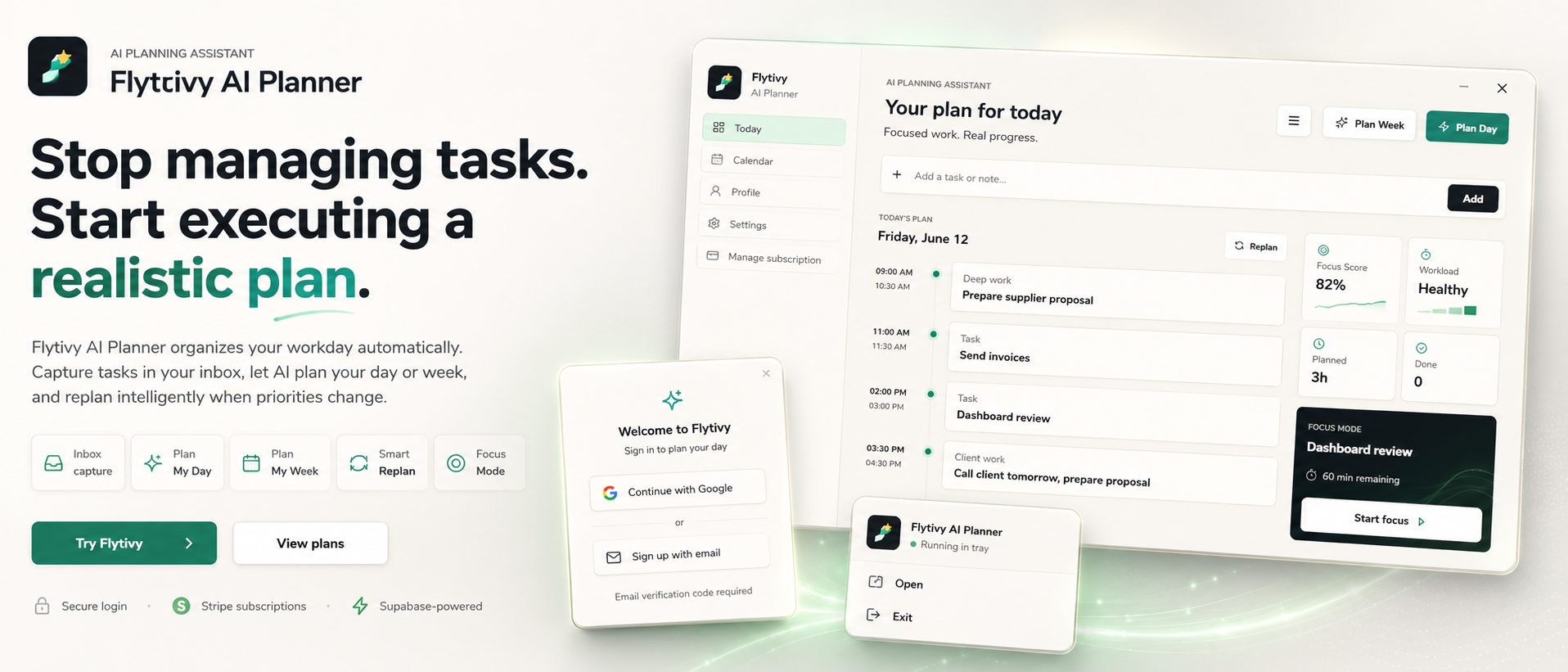
Flytivy AI Planner is designed for that kind of work planning. It helps you capture tasks and then turn them into a realistic day plan based on what matters now, how much time you actually have, and how demanding the work is.
Why loose task lists break daily planning
A loose task list usually contains a mix of:
- tasks with no clear duration
- items with deadlines but no sequence
- work that is important but mentally heavy
- quick tasks that keep interrupting deeper work
- meetings and calendar blocks that reduce available time
The problem is not that the list is incomplete. The problem is that it does not answer the planning question: what should happen today, in what order, and for how long?
That is where AI planning can help. Instead of forcing you to manually sort everything, Flytivy takes the inputs you already know and helps shape them into an executable day.
What realistic AI daily planning looks like
A realistic plan is not the same as a packed plan.
A good day plan should:
- fit into the time actually available
- respect deadlines and priorities
- account for the type of work involved
- avoid stacking too many demanding tasks back to back
- leave room for meetings, interruptions, and follow-up work
Flytivy is built around automatic work planning rather than acting like a generic calendar. Calendar and Gantt views are useful for visibility, but the core value is deciding what to do now and making the schedule more executable.
How Flytivy turns loose tasks into a day plan
You can enter the details you already know:
- task title
- deadline
- priority
- estimated duration
- energy type
Then Flytivy uses that information to create a plan for the day, a plan for the week, or a replan when work changes.
In practice, that means the app can help you move from:
- “I have ten things to do”
into
- “Here is the order for today, with time blocks that reflect reality”
This is especially useful for solo professionals, founders, consultants, project leads, remote workers, and small teams that need a calm but practical way to organize work.
A simple workflow for planning your day with AI
Here is a practical way to use AI daily planning in Flytivy.
1. Capture the loose tasks first
Start by entering everything you think might matter today.
Do not worry yet about perfect structure. Add the task, the deadline if you know it, and any duration estimate you can give.
2. Mark what matters most
Identify the tasks that are truly time-sensitive or high impact.
This helps the plan respect real constraints instead of treating every item as equally urgent.
For more on that, see How to Prioritize Tasks with AI When Everything Feels Urgent.
3. Use time and energy as planning inputs
Not every task belongs in the same part of the day.
A plan becomes more realistic when it considers whether work is:
- focused and deep
- quick and administrative
- high-energy or low-energy
- better suited for early or late in the day
4. Generate the day plan
Use Flytivy Plan Day to turn the task list into a schedule for today.
This costs 1 AI credit, and it helps convert a loose list into a plan with a clearer sequence.
5. Check the result and adjust what you can see
Review the proposed day plan and make sure the schedule matches your real availability.
Flytivy Coach can also help review tasks, conflicts, workload, credits, subscription state, and next actions.
6. Replan when something changes
If priorities shift or time disappears, do not rebuild the day manually from scratch.
Use replan so unfinished work can be reorganized around the new reality.
If you need a step-by-step example, read How to Replan a Busy Day with AI When Priorities Change.
How energy-aware planning improves the schedule
Energy-aware planning does not mean guessing how you will feel later. It means using a simple planning input to distinguish between work that is easier to start and work that needs more focus.
That helps you avoid putting every hard task into the same part of the day.
A practical AI daily planning flow can use energy type alongside duration and deadline so the resulting day is more executable.
Calendar views help, but they are not the core value
Flytivy includes calendar and Gantt views, which are useful for context and visibility.
But the product is not positioned as a generic calendar.
The core value is automatic planning: deciding what should happen now, protecting focus where possible, and reducing the need to manually shuffle work around.
That distinction matters if you are comparing tools for planning rather than simple scheduling.
How credits work in Free, Pro, and Ultimate
Flytivy uses AI credits for planning actions.
- Plan Day, Plan Week, and Replan each cost 1 AI credit
- Each Coach message costs 0.25 credits
- Free includes 30 AI credits per month for each of the first two associated-account months
- From month three, Free receives 0 new monthly AI credits unless the user upgrades
- Pro includes 350 monthly AI credits
- Ultimate includes 900 monthly AI credits
If you plan often, or if you rely on replan and Coach messages, it is worth checking whether your current plan matches your usage.
When to use Plan Day instead of planning manually
Plan Day is a good fit when:
- you have more tasks than time
- you do not want to spend the morning sorting priorities
- you need a realistic order of execution
- your list contains different types of work with different energy demands
- you want a plan that can be adjusted later if needed
Manual planning can work for simple days. But when the day is messy, AI daily planning can save the friction of constantly re-deciding what comes next.
Internal link suggestions
If you want to go deeper, these resources are a useful next read:
- How to Replan a Busy Day with AI When Priorities Change
- How to Prioritize Tasks with AI When Everything Feels Urgent
FAQ
What is AI daily planning?
AI daily planning is the process of using AI to turn tasks, deadlines, priorities, and available time into a realistic plan for the day.
Is Flytivy just a calendar app?
No. Flytivy is designed for automatic work planning. Calendar and Gantt views are available, but the core value is helping decide what to do now and how to sequence work realistically.
Can Flytivy help if my task list keeps changing?
Yes. Flytivy supports replanning, which is useful when priorities change or unfinished work needs to be reorganized.
Does Flytivy consider energy or focus?
Yes. You can use energy-related input and workload context to help shape a more realistic plan.
How many AI credits do I get on Free?
Free includes 30 AI credits per month for each of the first two associated-account months. From month three, Free receives 0 new monthly AI credits unless the user upgrades.
Final takeaway
If your task list is loose, the goal is not to make it look neat. The goal is to turn it into a day you can actually execute.
Flytivy AI Planner is built to help you capture tasks, shape a realistic plan, and replan when work changes. If you are ready to move from scattered tasks to a more practical schedule, start with Plan your day with Flytivy.
For a related workflow, you can also review How to Replan a Busy Day with AI When Priorities Change.